Multi USB chargers are increasingly popular for charging various devices, from smartphones to tablets. However, while they offer convenience, improper use can lead to safety hazards such as overheating, short circuits, and even device damage. This blog provides a comprehensive checklist for ensuring the safety of multi USB chargers in everyday situations. We’ll help you understand how to select high-quality chargers, optimize their use in different environments, and maintain them to prolong their lifespan and ensure safety. By following these guidelines, you can help prevent accidents and enjoy a seamless charging experience whether at home, in the office, or on the go.
Group 1 — Choose a Charger That’s Safe by Design
Check safety certifications and compliance marks
When selecting a charger, verifying its safety certifications is essential. Look for UL, CE, or FCC marks that guarantee the product meets industry standards for electrical safety and performance. These certifications are a sign that the charger has undergone rigorous testing and is less likely to pose a fire or electrical hazard. Always purchase from reputable brands and retailers to avoid counterfeit products that may not comply with safety regulations.
Match total wattage to your real device load
Understanding and matching the total wattage of a charger to your device’s needs is crucial. A charger’s wattage should be sufficient to power all your devices simultaneously without putting excessive strain on the charger, leading to overheating or inefficient charging. Calculate the total power requirement by adding up the power draw of each device, ensuring it does not exceed the charger’s output capacity.
Prefer GaN chargers with smart thermal control
Consider choosing chargers based on Gallium Nitride (GaN) technology, which tends to be smaller and more efficient than traditional chargers. GaN chargers offer enhanced thermal management features, preventing overheating and improving energy efficiency. With smart control mechanisms, they maintain optimal temperatures while charging multiple devices, enhancing both safety and performance.
See also: Cutting Edge Laser Technologies Transforming Modern Industries
Group 2 — Daily Use Safety Checklist at Home, Office, and Travel
Set up the charger in a cool, open, dry spot
Placement significantly impacts the efficiency and safety of a multi usb charger. Always set up your charger in a cool, open, and dry area to allow proper heat dissipation. Avoid locations near heat sources or direct sunlight, which can cause the charger to overheat. Ensuring adequate ventilation around the charger will help maintain its optimal operating temperature.
Use the right ports and avoid power “overbooking”
Efficient charging and safety require using the correct ports for each device, considering their power requirements. Overbooking by connecting too many high-demand devices can stress charger components and lead to overheating or reduced performance. Organize device connections based on power needs and ensure total power draw remains within the charger’s rating.
Inspect cables, plugs, and ports before each use
A quick inspection of cables, plugs, and ports before use can prevent significant issues. Look for signs of wear, fraying, or damage which could lead to short circuits or inefficient charging. Ensuring that all connections are secure and reliable helps maintain performance and minimizes risks of electrical problems.
Watch for heat, smell, noise, or flickering lights
During operation, stay alert for unusual signs such as excessive heat, burning smell, or strange noises coming from the charger. Flickering indicator lights may signal an internal issue. Such symptoms require immediate attention; disconnect the charger and examine it closely to prevent potential safety hazards.
Group 3 — Care, Upgrades, and Safe Multi-Device Charging
Clean, store, and transport chargers correctly
Proper care of chargers ensures longevity and efficiency. Regularly clean them using a dry cloth to prevent dust accumulation in ports. Store them in cool, dry places and transport them safely in padded cases to prevent physical damage. Handle with care to preserve their functionality over time.
Replace damaged gear and retire old chargers
Inspect your charging gear regularly and replace any damaged cables or chargers to avoid hazards. Energy-efficient advancements suggest retiring older chargers that may no longer meet safety or performance standards. Investing in new technology enhances charging efficiency and safety.
Build a safer multi-device setup with Anker
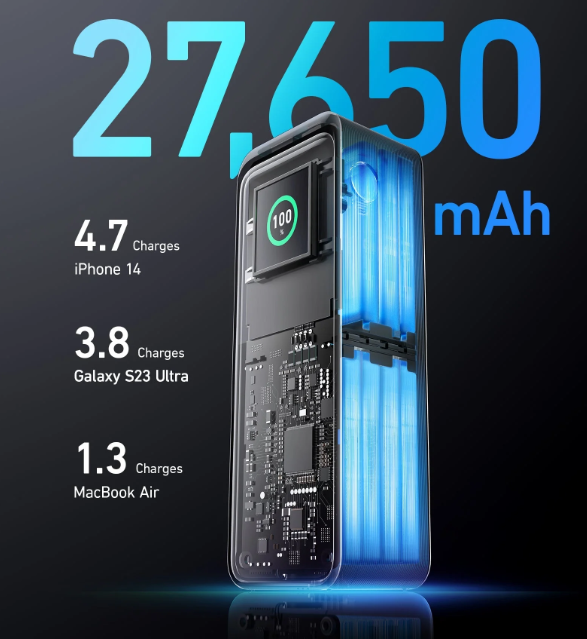
Anker offers industry-leading charging solutions focused on safety and performance. Consider their range of products designed for efficient multi-device charging setups. Anker’s chargers are renowned for their reliability and innovative safety features, providing peace of mind in daily use environments.
Conclusion
Ensuring safety while using multi USB chargers involves selecting certified products, observing proper setup, and performing regular maintenance. Following this comprehensive checklist helps minimize risks associated with overheating and electrical faults. Taking proactive measures in choosing and using chargers empowers you to safeguard your devices, maintain efficient charging, and prevent accidents. Prioritize safety in every charging scenario — your vigilance contributes to a secure and uninterrupted power supply for all your essential electronics.